Specifying the System Feed and Product Flows
Feed and product water flowrates can be specified using the text boxes in the middle of the blue arrows
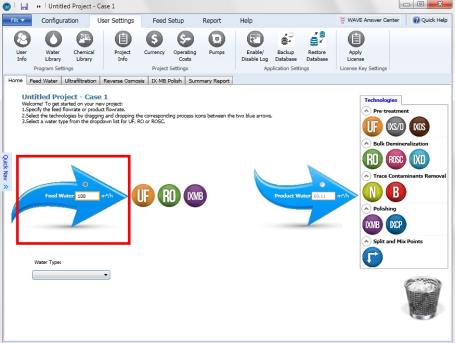
Figure 1: Specification of feed flowrate in a system design
First, Feed or Permeate flow option should be selected using the radio button in the upper part of the arrow, later the flowrate can be specified.
Notes:
- WAVE would display a warning if the Feed or Product flowrates are specified as 0 or a negative number.
- Given a feed water flowrate, WAVE would calculate a product flowrate based on a default recovery. Given a product water flowrate, WAVE would calculate a feed flowrate based on a default recovery.
-
Users can define a preliminary recovery for each icon and thus define either the feed flowrate and recovery or product flowrate and recovery (as shown in Figure 2).
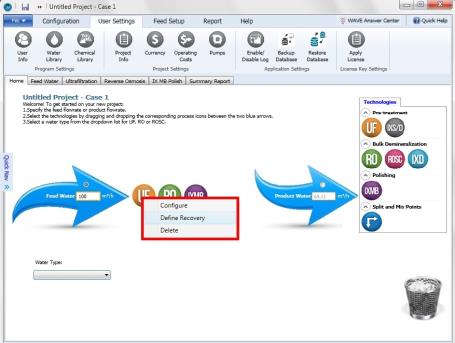
- Detailed system design with a user defined recovery is currently only possible for RO and ROSC. For other technologies recovery is known only after all the calculations are completed.
- WAVE does not allow simultaneous specification of the feed and product flowrates.